How to Tell if a Free AI Voice Generator Is Actually Good Enough
A five minute test I run before I trust any voice tool with a real project
Every free AI voice generator sounds great on its own demo. The demo sentence was picked to make it sound great.
Then you paste your real script. A price comes out wrong. A name gets mangled. Every question sounds like a statement. And you only notice after you’ve built a whole video around it.
I’ve been through that enough times that I now test every new tool the same way. It takes five minutes. Here is the whole process.
First figure out what «free» means here
«Free» covers very different deals. Before you test anything check which one you’re looking at.
Try it without an account. You paste a sentence or two and listen. Great for a quick check. Usually you can’t publish what you make.
Free credits when you sign up. You get a set amount of characters or minutes. This is where you can test a real script.
Free forever with limits. Short clips or fewer voices or a watermark. Fine for hobby use. Often not allowed for client work.
None of these are bad. Just don’t plan a project around a tier that was only built for testing.
Check these five things before you fall in love with a voice
I learned to read the small print the hard way. Here’s what I look at first.
- Commercial use. Can you put the audio in a monetized video or a client ad? Many free tiers say no. This one matters most.
- Download format. Can you actually download an MP3 or WAV? Some free tools only let you listen in the browser.
- Length limits. How many characters per clip? A two sentence limit is a sample. Not a workflow.
- Do credits expire? Monthly credits that reset push you to rush. Credits that stay give you time to learn.
- What happens to your text. Is your script stored? This matters if you paste anything private.
It takes two minutes to find these answers. It can save you from re-recording a whole project later.
The five minute voice test
Don’t test with «Hello and welcome.» Every voice reads that well. Test with the stuff that breaks AI voices.
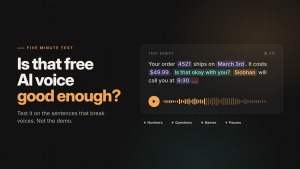
Here is the test script I use. Copy it as it is:
Your order 4521 ships on March 3rd. It costs $49.99 plus tax. Is that okay with you?
Great. Siobhan from our team will call you at 9:30.
One more thing… please read the guide before Friday.
It looks boring. That’s the point. Each line tests something different.
Numbers. Does «4521» sound like an order number or like four thousand five hundred twenty one? Does the price come out right?
Dates and times. Does «March 3rd» sound natural? Does «9:30» turn into nine thirty or something weird?
Questions. Does the voice lift at the end of «Is that okay with you?» A lot of voices read questions flat.
Names. How does it handle Siobhan? Almost no voice gets it right first time. That’s fine. You just want to see how bad it is.
Pauses. Does the ellipsis create a real pause? Does the line break give the voice a breath?
Listen once at normal speed. Then listen again with your eyes closed. The second listen is where you hear what your audience will hear.
Then test your own script
The standard test tells you how a voice handles tricky stuff. Your own script tells you if it fits your content.
Pick the hardest paragraph you have. Not the intro. The part with your product names or your numbers or your jargon.
Bad test:
Welcome to our channel. Today we talk about productivity.
Good test:
Our SaaS dashboard cut setup time by 40%. Version 2.1 adds Notion sync and Zapier triggers.
The first one tells you nothing. The second one shows you in ten seconds if the voice can handle your world.
If something comes out wrong try fixing the text before you blame the voice. Write «forty percent» instead of «40%.» Write «version two point one.» Most problems disappear with small fixes like that. I wrote a full guide on how to write a script an AI voice actually reads well if you want the details.
Where Sintra Studio fits in
Sintra Studio’s free AI voice generator is built for exactly the first step of this test. You don’t need an account to listen.
Here is what you get on that page:
- Paste up to two short sentences and press play
- Pick a male or female English voice
- Two free plays
- Download the MP3 after you confirm your email
Without an account your text is generated in memory and isn’t stored. The free sample is for testing voices. It’s not meant for publishing.
If the voice passes your test you can register for the free Starter plan. You get ten thousand credits with no card. One credit is one character so that’s roughly ten minutes of audio. The credits don’t expire. Registered accounts also get a bigger voice library with more languages.
One honest note. Their page says commercial use needs a paid plan. Check the current terms before you use the audio for client work. That goes for every free AI voice generator by the way. Not only this one.
When it’s time to pay
Free tiers are for finding out if a tool works for you. Here are the signs you’ve outgrown free:
- You publish audio on a monetized channel or for clients
- You need more than one voice in the same script
- You keep running out of characters halfway through a project
- You need control over pauses and pacing
If none of those are true yet stay on the free plan. There’s no prize for paying early.
My short checklist
- Find out what kind of free it is
- Check commercial use and download format
- Run the standard test script
- Test your hardest real paragraph
- Fix the text before you switch voices
- Upgrade only when free starts slowing you down
A free AI voice generator is the cheapest way to find the right voice. Just test it with the sentences that matter. Not the ones that make every voice sound good.